

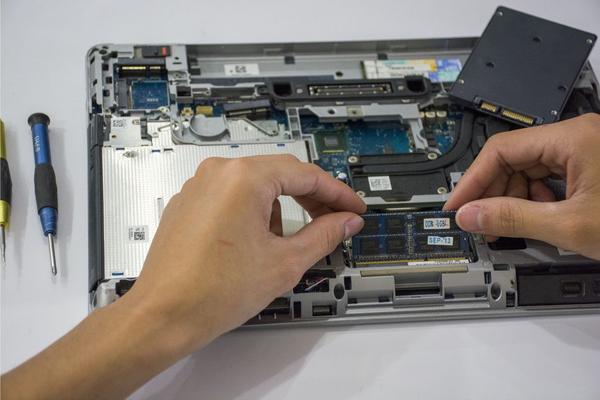
If you are buying a laptop in 2026, RAM is one of the easiest specifications to overthink. Some budget models still ship with 8GB, many mainstream machines now offer 16GB, and 32GB or more is common on gaming and creator-focused laptops. The right amount is not simply “the most you can afford.” It depends on what you run, how many things you keep open, and whether the memory can be upgraded later.
For most people asking how much RAM do I need for a laptop, the short answer is 16GB. It gives everyday users enough headroom for modern browsers, office apps, video calls, streaming, light photo editing, and normal multitasking without paying for capacity they may never use. Still, 8GB can be acceptable for basic use, while 32GB makes sense for heavier creative work, gaming, software development, and demanding multitasking.
What Laptop RAM Actually Does
RAM is the fast working memory your laptop uses for active apps, browser tabs, documents, game assets, and background processes. When there is enough RAM, the system can keep more data readily available. When RAM fills up, Windows, macOS, or Linux may move some data to storage. Modern SSDs are fast, but they are still much slower than system memory, so heavy swapping can make a laptop feel less responsive.
That is why a laptop with a capable processor can still feel sluggish when memory is tight. More RAM does not automatically make every task faster, but having too little can cause stutters, delayed app switching, tab reloads, and reduced performance during multitasking.
Is 8GB of RAM Enough in 2026?
8GB is still usable for a basic ram for laptop setup, especially for web browsing, email, streaming, school portals, word processing, and light spreadsheets. It can also suit a secondary laptop where most work happens in the browser and you do not keep many apps open at once.
However, 8GB is now better viewed as an entry-level amount than a comfortable long-term target. Microsoft still lists 4GB as the minimum memory requirement for Windows 11, but a minimum requirement only means the operating system can run. Microsoft’s Copilot+ PC requirements call for 16GB of RAM, which is a better signal of where newer Windows hardware is heading.
Consider a typical workday: Chrome with 15 to 20 tabs, a video call, Spotify, and Excel or PowerPoint open together. An 8GB laptop may start relying heavily on its SSD, causing tab reloads or pauses. A 16GB machine is much more likely to handle that workload smoothly.
Why 16GB Is the Best Choice for Most Buyers
For a general laptop ram guide in 2026, 16GB is the safest recommendation for mainstream buyers. It provides a strong balance between price, smoothness, and longevity. It is enough for typical office work, university use, coding, casual gaming, large browser sessions, basic content creation, and everyday multitasking.
It is especially sensible when buying a laptop with soldered memory. Many thin-and-light laptops and modern system-on-chip designs do not let you add RAM later. If the memory is fixed, choosing 16GB at purchase is usually wiser than saving a small amount on an 8GB model that may feel cramped after a few years.
Before buying, check the manufacturer’s specifications or a laptop buying guide to confirm whether memory is replaceable, partially upgradeable, or permanently soldered. Upgradeability can change how much RAM you need to pay for upfront.
16GB vs 32GB RAM: When Is 32GB Worth It?
The 16GB vs 32GB RAM decision comes down to workload rather than prestige. Moving from 16GB to 32GB does not double general laptop speed. If your normal usage only consumes around 10GB to 12GB, the extra capacity may sit unused. The upgrade becomes valuable when your applications regularly push beyond 16GB or you need more headroom for several demanding tasks at once.
Choose 32GB if you regularly edit high-resolution video, work with large RAW photo libraries, run virtual machines, compile large software projects, create complex music sessions, use engineering or 3D applications, or game while streaming and keeping many background apps active. Adobe’s current hardware guidance for professional video workflows recommends at least 32GB of memory, making that capacity a practical target for serious creators.
For gaming alone, 16GB remains adequate for many titles, but 32GB is increasingly attractive on higher-end systems because games, launchers, voice chat, browsers, mods, recording tools, and background services all compete for memory. When comparing gaming laptops, use a gaming laptop specs guide to balance RAM with the CPU and GPU instead of spending heavily on memory while accepting a weaker graphics chip.
Who Actually Needs 64GB or More?
64GB is specialist territory. It can be justified for professional 4K or 8K video projects, very large 3D scenes, heavy virtual-machine use, data science, local AI workloads, high-end engineering software, or workstation-class development. For ordinary productivity, browsing, schoolwork, and most gaming, 64GB offers little practical advantage over 32GB.
If you are unsure whether you need 64GB, you probably do not. Professionals who benefit from that capacity usually know which application, project size, or workflow is consuming their memory.
How to Decide Before You Buy
Start with your heaviest realistic workload, not the lightest thing you do. Think about the busiest hour of your normal week: perhaps a video meeting, 25 browser tabs, a large spreadsheet, and a photo editor running together. Buy for that scenario rather than for simple email checking.
Next, check upgradeability. If the laptop has replaceable memory modules, buying 16GB now and upgrading later may be reasonable. If the RAM is soldered, buy enough for the expected life of the machine. Finally, keep the specification balanced. Extra RAM cannot compensate for a weak processor, slow storage, or underpowered graphics, so a laptop processor comparison can be just as important as the memory figure.
FAQ
Is 16GB RAM enough for a laptop in 2026?
Yes. For most users, 16GB is the best all-round amount in 2026. It comfortably supports browsing, office work, video calls, studying, coding, light creative work, and mainstream gaming while leaving useful room for multitasking.
Should I buy 8GB or 16GB RAM?
Choose 16GB if your budget allows, particularly if the memory cannot be upgraded. Choose 8GB mainly for lighter workloads or a low-cost machine where browsing, documents, streaming, and email are the primary tasks.
Do I need 32GB RAM for gaming?
Not necessarily. Many games still run well with 16GB, but 32GB provides more headroom for demanding titles, mods, streaming, recording, browsers, and other apps running alongside the game.
Does more RAM make a laptop faster?
More RAM helps when the laptop does not have enough memory for its workload. Upgrading from an inadequate amount can make multitasking much smoother, but adding memory beyond what your apps use will not automatically improve CPU or GPU performance.
Conclusion
For most laptop buyers in 2026, 16GB is the practical sweet spot. 8GB remains workable for basic computing, 32GB is a smart upgrade for demanding creative, development, gaming, and heavy multitasking workloads, and 64GB or more should be reserved for specialist needs. Match the RAM to your real workload, check whether the laptop allows upgrades later, and avoid paying for capacity you are unlikely to use.
