

A conventional camera records whatever sits inside its frame. A 360 camera records the surrounding scene, including action behind the operator. That changes more than composition: it changes the lenses, how images are assembled, and when you decide where viewers should look. This 360 camera guide explains the technology and its practical limits.
Two Fisheye Lenses, One Surrounding View
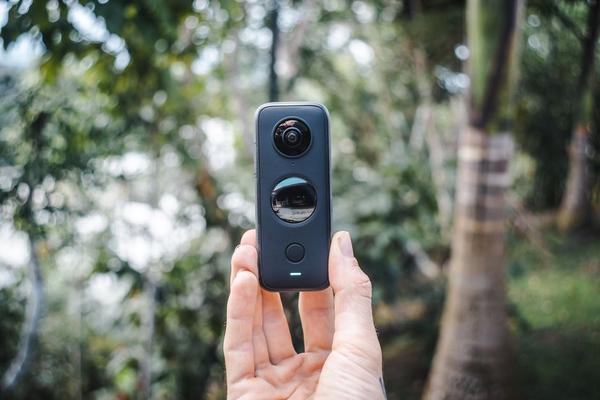
Most consumer 360 cameras use two fisheye lenses mounted on opposite sides of a compact body. Each captures slightly more than 180 degrees, providing overlapping edges that software can join into a sphere. Unlike a phone’s ultrawide lens, a dual lens camera collects the scene above, below, beside, and behind it.
The original images look like distorted circles because fisheye optics compress a huge field of view onto flat sensors. Software transforms those views into a navigable panorama. The camera body and mounting hardware can still obscure small areas, so “everything” does not mean an absolutely unobstructed view.
How 360 Video Stitching Works
Stitching aligns overlapping lens views, corrects distortion, and blends their edges. The result is commonly stored in an equirectangular projection: a wide rectangle that represents the entire sphere. Compatible players map that rectangle onto a virtual globe, allowing viewers to look around.
Some cameras stitch internally; others process or refine footage with companion software. Depending on the model and recording mode, you may receive a finished panorama or two fisheye views that require conversion.
Why Seams and Distortion Appear
Because the lenses occupy slightly different positions, they see nearby objects from different angles. This parallax can make a hand, railing, or bicycle handlebar appear doubled or warped along the stitch boundary. Fast movement adds another challenge when the software tries to match details from both views.
Keep important subjects away from that boundary. When filming friends around a café table, face one lens toward them instead of positioning faces directly beside the camera. Give nearby objects space; recommended minimum stitching distances vary by model. Previewing the result is more useful than assuming every seam will disappear.
What 5.7K and 8K Resolution Actually Tell You
Resolution labels on 360 cameras describe the complete panoramic frame, not the smaller view someone sees when looking forward. Pixels are spread across the sphere. When you crop an ordinary rectangular shot from that recording, you use only a portion of the available detail.
That is why an 8K immersive camera does not necessarily match the sharpness of a conventional 8K camera aimed directly at the subject. Reframed quality also depends on field of view, sensor performance, compression, and lighting. Tight crops magnify fewer source pixels and can look soft.
Before filming a lengthy project, export a test clip at your intended vertical or horizontal format. Examine signs, distant buildings, and hair at normal playback size. Real export quality matters more than the number printed on the box.
Stabilization and Horizon Leveling
A 360 camera can rotate or tilt while recording without locking the final viewing direction to that movement. Gyroscopes and other motion sensors track camera orientation, while software stabilizes the chosen view inside the spherical recording. Horizon leveling helps keep the result upright.
This is valuable for walking tours and action sequences, but it cannot restore detail lost to motion blur or perfectly correct a poor stitch. Understanding camera stabilization basics also helps explain why a steady-looking clip can still contain blurred frames when the shutter speed is too slow.
Reframing: Choose the Shot After Recording
Here is the most useful way to think about a 360 camera explained in everyday terms: record the whole scene first, choose the frame afterward. Companion apps let you rotate a virtual camera, change its field of view, and place keyframes that shift attention during playback.
Imagine walking through a crowded market with a camera on an extension stick. One clip could become a forward-facing street view, a reaction shot of you, and a smooth turn toward a stall. You are creating several different edits from one spherical recording rather than physically pointing the camera three ways.
Many editors provide automatic subject tracking, templates, and speed effects. Review those results carefully: tracking may struggle when people cross paths or the subject disappears behind an obstacle.
Immersive Video Versus a Standard Export
A spherical export preserves interactive viewing on compatible phones, websites, and headsets. A reframed export becomes an ordinary rectangular video with your chosen camera movements. Virtual tours benefit from the first approach; most social-media clips work well with the second. Not every website or player supports interactive 360 playback.
Practical Techniques for Cleaner Footage
Clean both lenses before shooting. A fingerprint on either lens can spoil a large portion of the scene. Consider where the stitch line falls, what appears immediately below the camera, and whether one lens faces much brighter light than the other.
For a property walkthrough, mount the camera securely at a natural viewing height and move slowly through doorways. Pause briefly in each room so viewers can explore the layout. Check a stitched preview around mirrors, narrow corridors, and close furniture before recording the entire property.
An aligned, compatible extension stick can sometimes disappear through stitching, creating a floating-camera effect. That trick is not guaranteed with every mount or camera angle. Also check the surroundings for people, private documents, and screens: a 360 recording may capture details you did not notice while filming.
What Matters When Comparing 360 Cameras
Look beyond resolution. Lens durability, sensor size, low-light quality, stabilization, battery life, recording limits, heat management, and storage demands affect the experience. The editing app matters almost as much as the hardware because framing and exporting happen there.
Large panoramic files can require significant processing time. Check compatibility with your phone, computer, and intended publishing platform. If you mostly need a fixed forward-facing shot, a conventional action camera may offer simpler editing and more detail in the final frame. Comparing action cameras and 360 cameras can clarify which approach fits your projects.
Frequently Asked Questions
Does a 360 camera capture a complete sphere?
Usually it captures a nearly complete spherical view. The camera body, lens geometry, and mounting accessories can leave small blind spots or imperfect stitched areas.
Can I watch 360 footage on a regular phone?
Yes. Compatible apps let you drag or move the phone to explore the scene. You can also export a flat video that plays in ordinary apps.
Why does reframed 360 video look less sharp?
Its pixels cover every direction, while a flat crop uses only part of the recording. Heavy cropping, dim light, and compression can further soften the image.
Is stitching always automatic?
No. Many consumer cameras automate it, but certain formats and workflows need companion software. Some editing tools also offer alternative stitching settings for difficult scenes.
Conclusion
A 360 camera separates recording from composition. Opposing fisheye lenses gather the scene, stitching software builds the sphere, and stabilization and reframing determine how the audience experiences it. Understand the limitations of seams, distance, and resolution, and you can use that flexibility with much greater confidence.
